Removing description from Firefox bookmarks
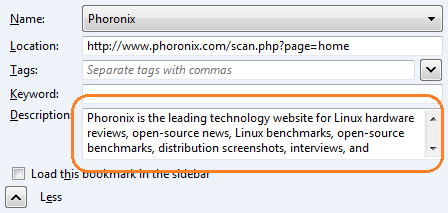
By default Firefox populates the Description field of a bookmark with the content of the page’s <meta name="Description" content="..." /> tag. I find is a little annoying and was looking for a way to remove these descriptions.
Since I have a lot of bookmarks I wanted to clean them all up in one go rather than editing them one by one. Luckily there is an easy way to do this since Firefox stores the bookmarks in an SQLite database file which can be opened and manipulated.
-
Install SQLite Database Browser (Ubuntu:
sudo apt-get install sqlitebrowserWindows: download and install from SourceForge). -
IMPORTANT! Export your Firefox bookmarks to have a backup in case something goes wrong.
-
Close Firefox (you can’t edit the bookmarks file while Firefox is running).
-
Run SQLite Database Browser and open the places.sqlite file which is located in your profile folder.
-
Run the following SQL which will remove the description from all bookmarks.
delete from moz_items_annos where anno_attribute_id = 2 -
Save and close, run Firefox.
Reference on the places.sqlite file can be found on mozillaZine and Mozilla Developer Network.