Setting BIRT chart series palette dynamically, part 3 – stacked bar charts
In what is rapidly becoming a mini-series, we have so far discussed how to set BIRT chart palette dynamically (based on category values) for pie charts and area charts. Today we cover stacked bar charts, i.e. bar charts with the Optional Grouping data element.
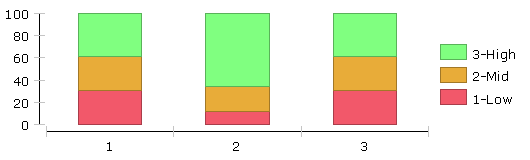
Once again, let’s start with a quick recap. In what is a fairly common scenario, one chooses the palette colours to match with particular category values. For example, in the chart below “High” is represented in green, “Mid” in orange and “Low” in red.
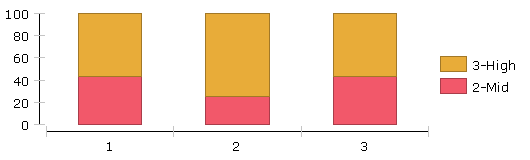
However, if for a particular dataset one of the of category values is not present, the palette colours are still used in the same order, meaning the “Mid” area is now shown as red and “High” as orange. This is confusing for the end user:
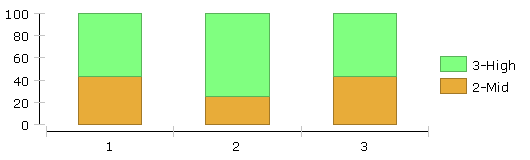
As in the previous examples, we solve this problem by adding a little bit of script to override the chart’s default behaviour.
function beforeDrawDataPoint( dph, fill, icsc )
{
  var sValue = dph.getSeriesDisplayValue();
  // set( R, G, B, alpha )
  if( sValue == "1-Low" )
  {
    fill.set( 242, 88, 106, 255 );
  }
  else if( sValue == "2-Mid" )
  {
    fill.set( 232, 172, 57, 255 );
  }
  else if( sValue == "3-High" )
  {
    fill.set( 128, 255, 128, 255 );
  }
}
We also need to override the beforeDrawLegendItem method, so that colours in the legend match the chart colours.
function beforeDrawLegendItem( lerh, bounds, icsc )
{
  var sValue = lerh.getLabel().getCaption().getValue();
  var fill = lerh.getFill();
  // set( R, G, B, alpha )
  if( sValue == "1-Low" )
  {
    fill.set( 242, 88, 106, 255 );
  }
  else if( sValue == "2-Mid" )
  {
    fill.set( 232, 172, 57, 255 );
  }
  else if( sValue == "3-High" )
  {
    fill.set( 128, 255, 128, 255 );
  }
}
The palette colours are now assigned dynamically based on actual category values. The rendered chart looks as shown below, independent of the colours selected in Chart Wizard and their order.